Routes · Discovery · Community

Walk the city.
Live its story.

Roamify brings together the routes locals and travelers actually walk — with their stops, photos and times. Discover, save, set off, then share a route of your own.

Coming soon to the App Store and Google Play.

A map shows you the way. Roamify tells you why that way is worth walking — stop by stop, photo by photo, through the eyes of people who walked it.

How it works

From discovery to the road, in five steps.

Every route on Roamify is a small journey with a start, stops, a duration and a story. Here is how you find one and live it.

1

Discover

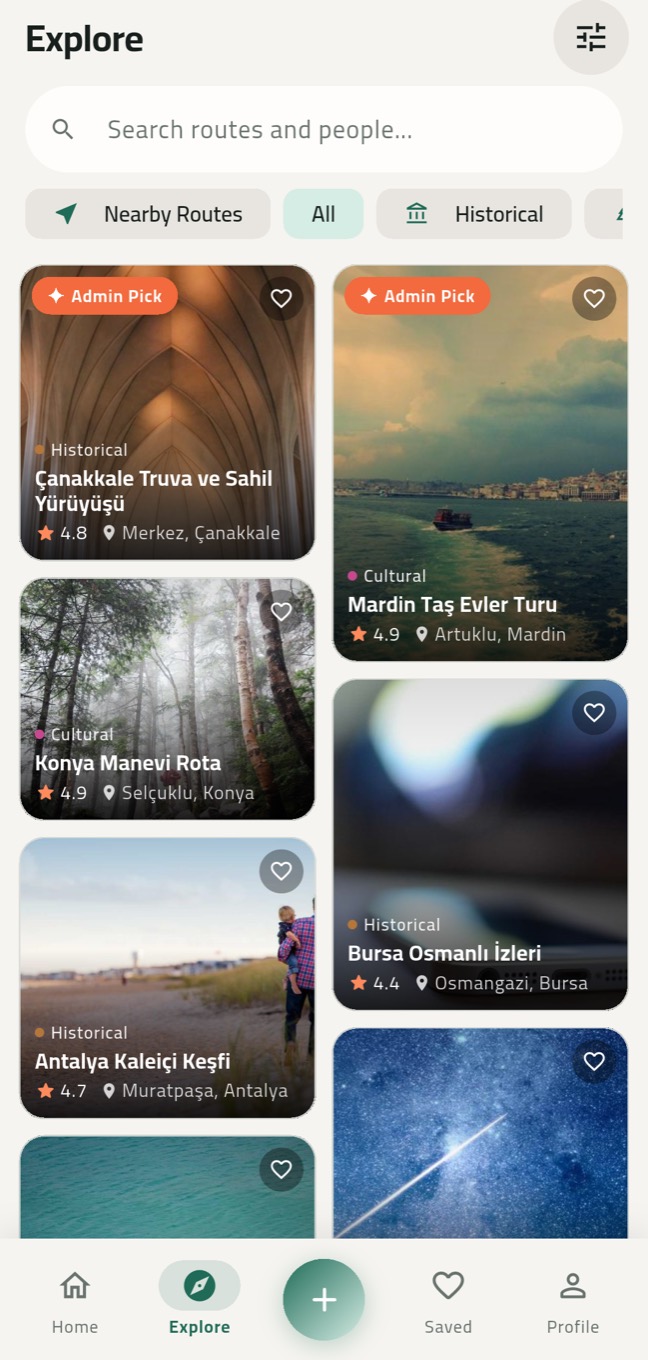
Search by city, category, tag or route number. Each route fits on one card: sliding photos, rating, duration and place.

  • Historical, nature, food, nightlife and four more categories
  • Country, city and district filters; newest, top rated, trending
  • Admin Picks: routes hand-picked by our team
Roamify Explore screen with category filters and route cards
2

Check it before you go

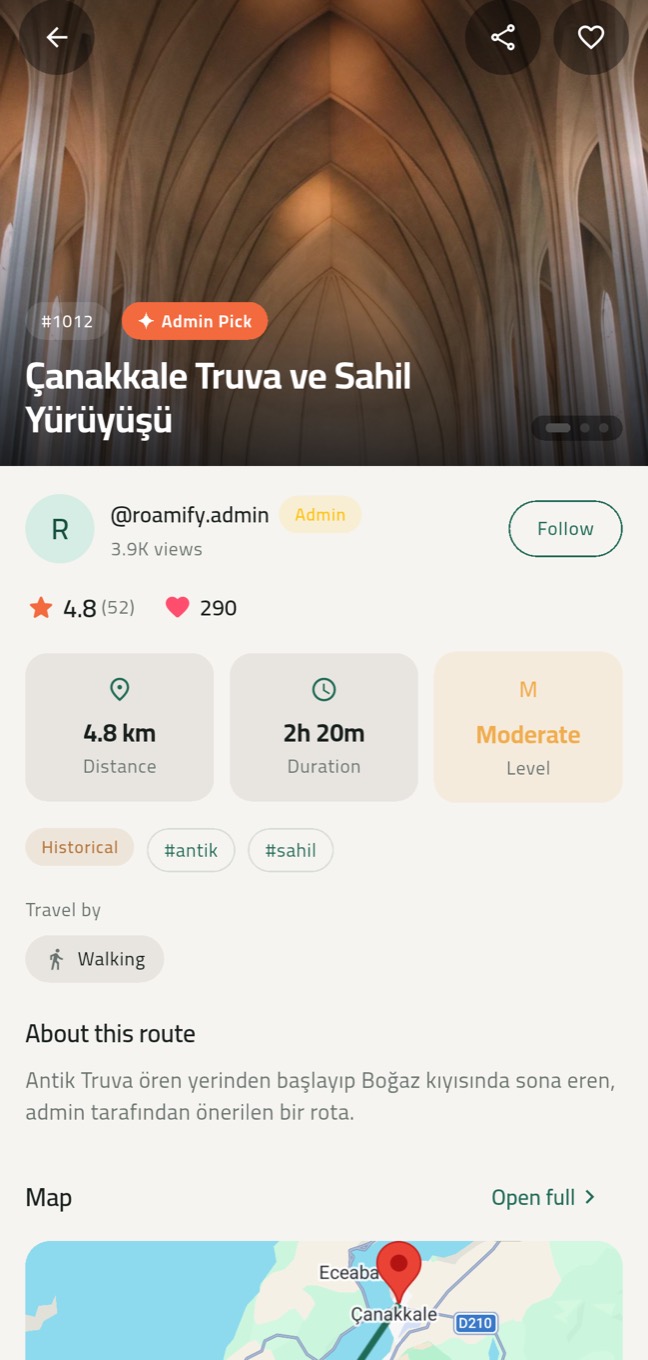
See the distance, walking and driving time, difficulty, getting-around notes and real ratings on one screen.

  • A swipeable photo gallery
  • The creator's profile, ratings and comments
  • Save to favorites or share with a friend in one tap
Roamify route detail with distance, duration, difficulty and description
3

See it on the map, then go

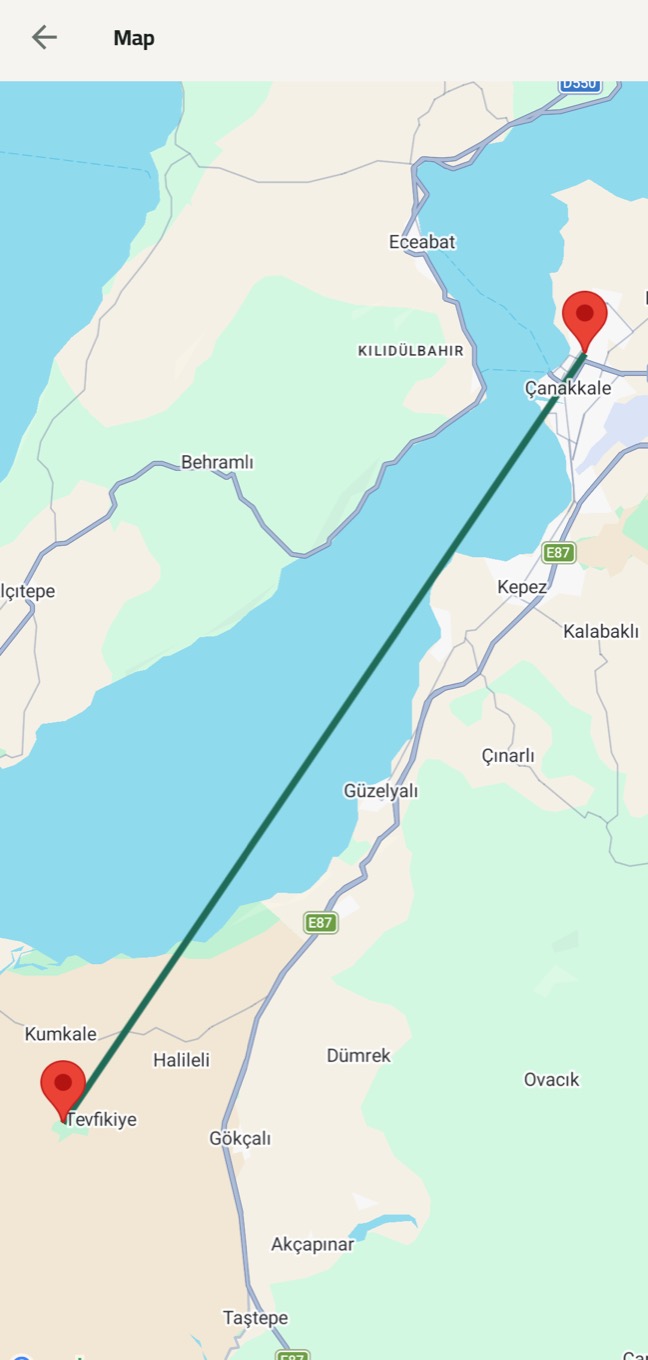
Every stop on the map, in order and connected. Start navigation when you are ready; on Huawei devices without Google services the map runs on OpenStreetMap.

Roamify map with the route's stops
4

Go stop by stop

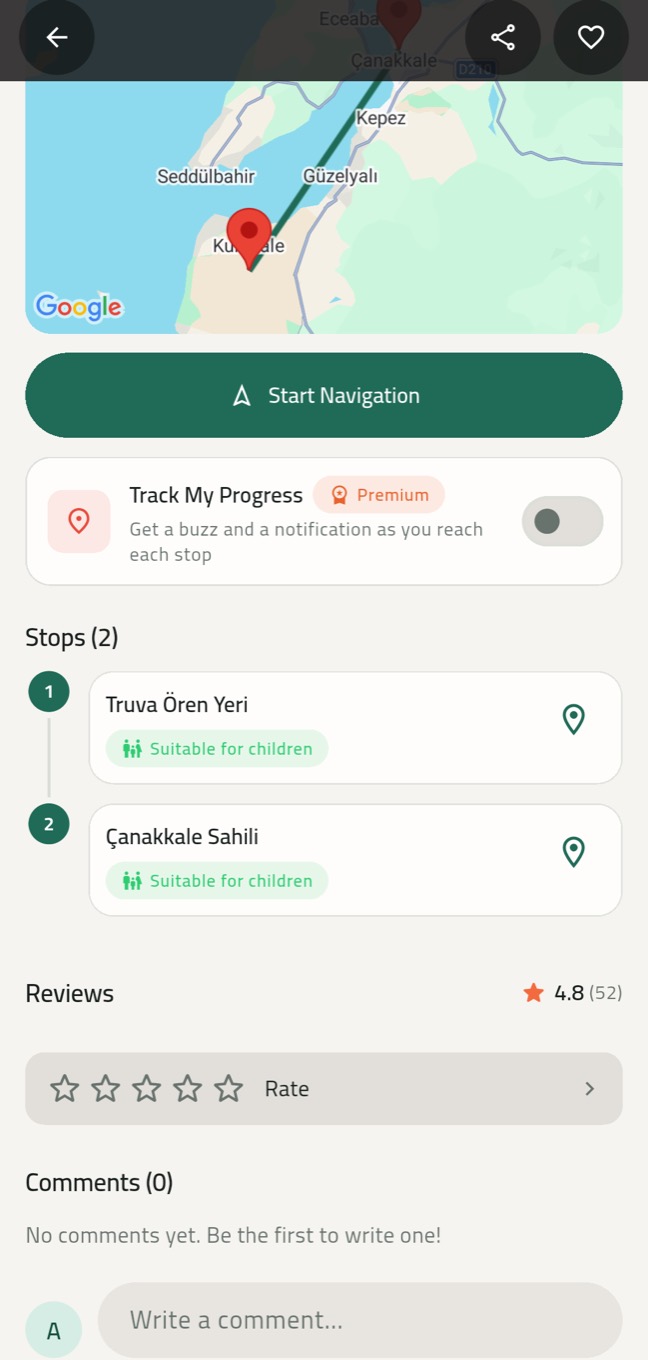
Every stop's photos, description and location in your pocket. With Track My Progress on, your phone buzzes and notifies you as you reach a stop — even with the app in the background.

  • Child-friendly stop labels
  • Open any stop on the map in one tap
Roamify stop list and the Track My Progress switch
5

Share your own route

Let others experience the places you love. Build a route in four steps; Roamify works out the walking and driving times, and our team reviews and publishes it.
Roamify route creation screen
Features

Everything that makes exploring easier.

A calm interface — with every detail you need once you are out there.

A feed that comes alive

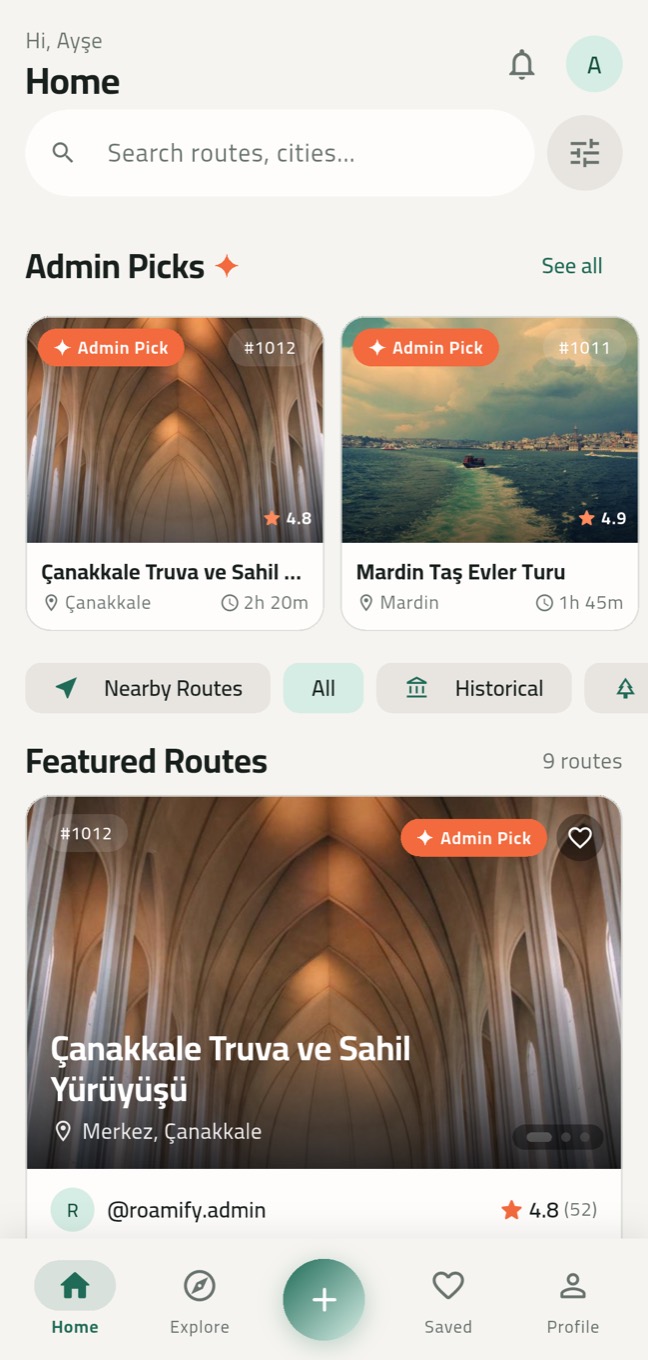
Up to three photos per route and two per stop. Cards on Home slide on their own — or turn that off in Settings.

Roamify Home with Admin Picks and featured routes
PREMIUM

Nearby routes

Routes sorted by how far they are from you. Your location is processed on your device and never sent to our servers. Location off? Turn it on, come back, and Roamify picks up where you left off.

PREMIUM

Track my progress

A buzz and a notification at every stop. Even with your phone in your pocket.

Rate and comment

Real experiences, real ratings. Like helpful comments, report anything inappropriate.

Favorites and following

Save the routes you like and follow the creators you love.

5 languages, full RTL

English, Türkçe, Français, Deutsch and العربية with full right-to-left support.

Automatic drafts

Leave while creating a route and everything is kept as a draft — continue right where you stopped.

Every device, Huawei included

iPhone, Android and Huawei devices without Google services. The map works on all of them.

A route for every mood

From history to nightlife.

Categories: Historical, Nature, Walking, Food, Nightlife, Cultural, Adventure, Family.

For route creators

Where you have been can guide whoever goes next.

That street, that view, that food stop you know… Turn it into a route in four steps and share it with travelers.

  1. 1

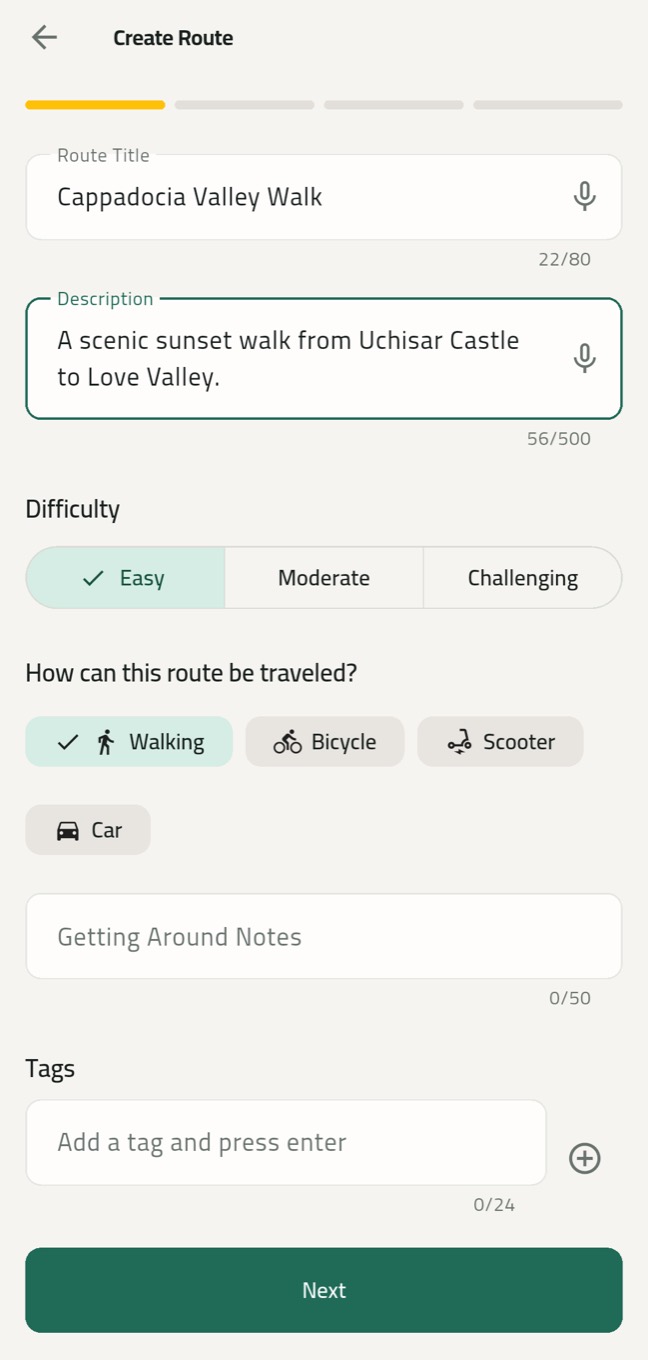
    Photos and details

    Title, description, difficulty, getting around and tags. Add three cover photos; crop and rotate them. Dictate instead of typing if you like.

  2. 2

    Location

    Pick the country, city and district so your route is listed in the right place.

  3. 3

    Stops

    Drop them on the map or search by name. Give each stop a description and two photos.

  4. 4

    Preview and submit

    Distance and walking and driving times are calculated for you. Our team reviews it and your route goes live.

First step of the Roamify route creation wizard
Trust

Quality and privacy by default.

Reviewed routes

Every route is checked by our team before it goes live. Anyone can report inappropriate content in one tap.

Your location stays with you

It is only used when you allow it, processed on your device and never sent to our servers.

No hidden location in photos

GPS and device details (EXIF) are stripped from your photos before they are uploaded.

About us

We share experiences, not just places.

Roamify was born to answer “what should I do in this city?” not with a pile of pins, but with a route someone has actually walked.

Our mission

Turn local knowledge into routes anyone can follow, so travelers plan less and experience more.

What we believe in

Simplicity, trust and community. Useful content over clutter. Every route is reviewed, and every user stays in control of their data.

Where we are headed

Built in Türkiye, open to the world in five languages. Our goal: the place to find the best routes in every city, for every interest.

Frequently asked questions

Good questions.

Is Roamify free?

Yes. Discovering, saving, rating and commenting on routes and sharing your own are free. A few advanced features such as Nearby Routes and Track My Progress are part of Premium — you can also unlock them free for two hours by watching a short ad.

Can I use it without an account?

Yes, you can browse every route as a guest. To save favorites, comment or create routes, sign up for free with email, Google or Apple.

Is my location shared?

No. Your location is only used when you allow it, to sort nearby routes and track your progress. That happens on your device; your location is never sent to our servers or shown to other users.

How do I share my own route?

Tap the + button and add photos, the location and your stops in four steps. Walking and driving times are calculated for you. Our team reviews your route; once approved it goes live, and if something needs fixing we tell you why.

Which devices does it work on?

iPhone and Android phones. On Huawei devices without Google services the map runs on OpenStreetMap.

I think a photo is being used without permission.

Use “Report” on the route or email iletisim@theroamify.com with a link to the route. We review notices quickly and remove content where needed.

How do I delete my account and data?

In the app go to Profile > Settings > Delete account, or sign in on the account deletion page to permanently delete your account and all of its data.

Your next route is waiting.

Download Roamify and explore your first route. Like it? Add one of your own.

Coming soon to the App Store and Google Play.

Contact

Write to us.

Questions, ideas, partnerships or a problem — we read every message and usually reply within two business days.

In-app support

Open a request from Profile > Settings > Support and read our reply right in the app.

Your personal data

For requests about your data, write with the subject “Data request”. Details are in our privacy policy.

Pressing send opens the message in your email app; this page does not store anything.